Awasu 2.1.3.alpha2
IMPORTANT: This is an alpha release (what's this?).
Some features are not complete and you will find bugs!
You must be already running 2.1.2
or 2.1.3.alpha1
To install:
- Read the release notes below first!
- Backup your Awasu installation directory and keep it, even if
the alpha appears to work correctly.
- Unpack one (!) of the following zips on top of your existing installation:
- It is recommended (but not necessary) that you run ResetUi.exe (in the Awasu installation directory)
to reset your UI settings. If you have customized your toolbars or keyboard shortcuts,
you may want to try skipping this step. However, if you see any problems (e.g. icons
that don't match their apparent function), you should reset your UI (toolbars
and docking windows).
Major changes
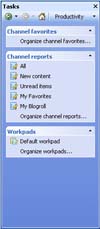
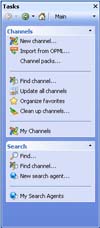 The upgrading of Awasu's UI continues!
The new Task Pane (right) brings together the most commonly used features
of Awasu into a single place for quick access.
The second page provides immediate access to Awasu's productivity tools.
For example, those of you who use reports extensively (hi Earl!) will like
being able to dock the Task Pane to one side of the main window and having
immediate access to all of your reports.
 This release also introduces the Downloaded Files window (left)
that tracks all the podcasts and other files that Awasu has downloaded for you.
From here, you can play them or save them by dragging them off to an Awasu workpad
or Explorer window.
This release also introduces the Downloaded Files window (left)
that tracks all the podcasts and other files that Awasu has downloaded for you.
From here, you can play them or save them by dragging them off to an Awasu workpad
or Explorer window.
Finally, Awasu now implements a application sidebar. This is
a special window that can be docked to one side of your desktop that contains
the latest items from your favorite channels. The sidebar can be turned on
in the Display page of the Program Options dialog and individual channels
added to it from the main page of the Channel Properties dialog (screenshots below).


Other major changes include:
- Items in workpads can now have their main descriptions modified.
- Files and other links can now be dragged into Workpads from Explorer
and other Explorer-compatible sources.
- Optimized the calculation of unread feed item counts. You should see a
noticable improvement in the performance of Awasu (especially relating to
the responsiveness of the UI).
Other changes and bug fixes
- The maximum number of items that will be shown for a channel in the system tray menu
can now be set in the channel's Properties dialog.
- Optimized the handling of DEBUG.INI switches.
- Fixed a possible crash at startup on multi-CPU (or hyper-threaded) machines.
- Show the source for workpad items correctly.
- Tweaked the way mini-dialogs are positioned and save/restore their positions correctly.
- Track the last time a channel window was opened.
- Don't show an error balloon if the latest channel packs couldn't be saved
(typically because Awasu is being run from a limited user account and doesn't
have permissions to modify the main file).
- Prevented two instances of the Options dialog from being on-screen at once.
- Disabled the feed:// protocol handler by default.
- Fixed some bugs if "consolidate multiple new items into a single balloon"
is turned on for a channel (in particular, the sound wouldn't be played nor the system tray icon
be animated).
- Moved the enclosure-related settings in the Channel Properties dialog
from the Advanced page to the Channel page (this allows default values to be set
in the Channel page in the Options dialog).
Known issues
- The full-screen toolbar button in the channel windows is broken (F11 still works).
- Some images do not draw correctly if your display is set to show 16-bit images.
- Images in the Task Pane don't draw correctly in versions of Windows other than XP
if your display is set to 32-bit (we are still waiting for a fix from a third-party vendor
to resolve this issue).
- The Downloaded Files window requires you to double-click, even if Awasu is configured
to run in one-click mode.
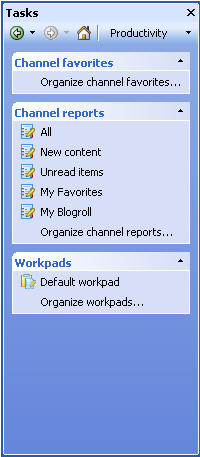
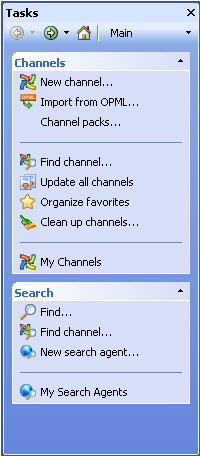 The upgrading of Awasu's UI continues!
 This release also introduces the Downloaded Files window (left)
that tracks all the podcasts and other files that Awasu has downloaded for you.
From here, you can play them or save them by dragging them off to an Awasu workpad
or Explorer window.
This release also introduces the Downloaded Files window (left)
that tracks all the podcasts and other files that Awasu has downloaded for you.
From here, you can play them or save them by dragging them off to an Awasu workpad
or Explorer window.